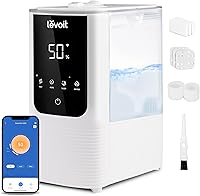
What Should You Set Your Humidifier To?
For what should you set your humidifier to, start at about 40% relative humidity, then adjust using a room reading and signs of condensation. Keep indoor humidity below 60%.
On this page (11 sections)
- What should I set my humidifier to for a comfortable room?
- How can you tell if the setting is right?
- Should you set a humidifier to 60%?
- How should you set a humidifier with a humidistat?
- What should you set a warm mist humidifier to?
- Why might you need a lower setting in winter?
- Where should the humidifier and hygrometer go?
- How do you set up and adjust a humidifier?
- What common humidifier setting mistakes should you avoid?
- Which humidity monitor or humidifier should you choose?
- What should you set your humidifier to every day?
Set your humidifier to about 40% relative humidity as a starting point, then adjust using a room reading and signs of moisture on windows or other surfaces. Keep indoor humidity below 60%.
If you're asking what should i set my humidifier to, think of 40% as a first setting to check, not a number to chase at all costs. The right output depends on the room, the weather, and how your home responds.
What should I set my humidifier to for a comfortable room?
Start around 40% relative humidity. If the room reading remains low and nearby surfaces stay dry, raise the setting gradually; if moisture appears, lower it or pause the unit.
A number on the control is only a target for the humidifier. Check the room with a hygrometer and inspect windows, walls, and furniture.
Reduce output if they become damp, even when the displayed reading seems acceptable.
For broader guidance on household targets, see what the humidity should be in a house. It also covers comfort and wood floors.
How can you tell if the setting is right?
Use a room hygrometer and watch for condensation. A meter lets you compare conditions over time, while damp glass or surfaces are a clear reason to reduce humidification.
Take readings in the same general area when comparing adjustments. Keep the meter out of the mist stream and away from direct heat or drafts so it better reflects the room.
For app alerts and graphs, the Govee H5075 tracks humidity changes and flags readings outside a preset range. It uses Bluetooth, with a stated range of up to 164 ft in open, unobstructed areas, and does not support Wi-Fi.
If you prefer a local display, the TempPro TP50 shows dry, comfort, or wet conditions and records high and low readings. Its stand and magnetic back give you two placement options.
Should you set a humidifier to 60%?
Use 60% as an upper limit, not a routine target. If a room approaches that level or develops condensation, reduce the setting and check again.
Moisture can show up on cool windows before the room reading looks unusually high. Turn the humidifier down or off, then let the damp area dry before increasing output.
Avoid running a humidifier continuously just to hold one number. Follow the manual for cleaning and operation, and keep the area around the unit dry.
How should you set a humidifier with a humidistat?
Set the built-in humidistat near your target, then compare its result with a separate room reading. Sensor location and room conditions can make the unit's number differ from the humidity elsewhere in the room.
Some models let you choose an exact target, while others provide a small set of humidity or comfort settings. Use the controls your model offers and check the result with a hygrometer placed away from the mist.
The guide to humidifiers with a built-in humidistat can help if automatic humidity control matters to you. The DREO HM524S has adjustable humidity control and app monitoring, along with touch and voice controls.
The Honeywell Easy-to-Care Warm Mist suits buyers who want a programmable humidistat with 5 humidity settings and 2 comfort settings. It also shuts off automatically when the tank is empty.
What should you set a warm mist humidifier to?
Choose the setting that moves the room toward your target without causing condensation. Warm mist models may offer preset levels instead of an exact percentage, so check the manual to understand each control.
Place a warm mist unit on a stable surface and follow its instructions for filling and cleaning. It produces steam, so keep it out of children's reach and away from areas where a spill could cause a burn.
Why might you need a lower setting in winter?
Cold weather can make windows more prone to condensation, so you may need to lower the setting in winter. Check the room reading and window glass as outdoor temperatures change.
If condensation forms, reduce output or pause the unit until the moisture clears. A setting that worked on a mild day may be too high during a cold snap.
If the air still feels dry, check the hygrometer's placement and whether its reading represents the room. The guide to raising humidity in a house covers other ways to add moisture.
Where should the humidifier and hygrometer go?
Put the humidifier where mist can disperse without wetting nearby surfaces, and put the hygrometer elsewhere in the room. Keep the unit away from walls, curtains, electronics, and furniture that could become damp.
A separate meter should not sit in the immediate mist or close to a heat source. See where to put a humidifier in a bedroom for more placement advice.
How do you set up and adjust a humidifier?
Start with a clean unit, a suitable location, and a room reading. Make one small setting change at a time so you can see how the room responds.
- Read the unit's instructions for filling, controls, placement, and cleaning.
- Place it on a stable surface with room for mist to disperse.
- Put a hygrometer elsewhere in the room, away from mist, heat, and drafts.
- Take a reading, then start near 40% if the unit accepts a percentage target.
- Check the reading and nearby surfaces after conditions change.
- Lower output or pause the unit if condensation appears.
Use the water recommended in your humidifier manual and clean the unit on the schedule it specifies. For more on water choice, read whether you need distilled water in a humidifier.
What common humidifier setting mistakes should you avoid?
Don't rely on a single sensor reading or raise output just because the room still feels dry. Check the meter's position, the room conditions, and any signs of moisture before changing the setting.
Avoid aiming for 60% as a default, placing the hygrometer in the mist, or leaving the humidifier running without checking the room. Also avoid ignoring condensation because the humidifier's own display shows a lower number.
Which humidity monitor or humidifier should you choose?
Choose based on how you want to check humidity and control output. A simple meter is enough for occasional room checks, while app alerts or an adjustable humidistat help if you want more active control.
- Choose the TempPro TP50 for a simple tabletop reading, high and low records, and a quick dry, comfort, or wet indicator.
- Choose the Govee H5075 if you want app alerts and humidity graphs, and Bluetooth coverage is enough for your layout.
- Choose the Honeywell warm mist humidifier if you want a programmable humidistat with several settings and are prepared to place a steam-producing unit carefully.
- Choose the DREO HM524S if you want adjustable humidity control with app, touch, or voice operation.
Skip app-connected monitoring if you only need a quick reading at the device. Skip warm mist if you can't place a steam-producing unit safely, and skip extra controls if a basic output setting already meets your needs.
What should you set your humidifier to every day?
For what should i set my humidifier to every day, start around 40%, keep the room below 60%, and lower output if you see condensation. Check with a separate hygrometer, especially when the humidifier's sensor is built into the unit.
Pick the TP50 for simple checks, the Govee for app tracking, the Honeywell for warm mist settings, or the DREO for adjustable smart controls. For household targets, see what humidity should be in a house.
Frequently asked questions
What should I set my humidifier to in winter?
Start near 40% relative humidity, then lower the setting if windows or other cool surfaces collect condensation. Cold outdoor weather can make indoor windows more prone to moisture, so check the room rather than assuming one setting works all season.
Keep indoor humidity below 60%.
Is 60% humidity too high for a house?
Treat 60% as an upper limit, not a target to exceed. If a room stays near or above that level, reduce or pause humidification and check for damp windows, walls, or other surfaces.
Use a room hygrometer away from the humidifier's mist to confirm the reading.
Should I use the humidifier's built-in humidity reading?
Use it as a guide, then compare it with a separate hygrometer placed elsewhere in the room. A reading near the mist outlet may not reflect humidity across the space.
Check the humidifier manual for how its sensor works and where to place the unit.
Where should I put a hygrometer?
Place a hygrometer in the room you want to monitor, away from the humidifier's mist and from direct heat or drafts. A separate reading helps you judge the room's humidity instead of relying only on a sensor near the unit.
Our bedroom placement guide covers where the humidifier itself should go.